
How to Change Your TikTok Username (Step-by-Step Guide)
Changing your TikTok username is a simple but powerful way to refresh your online identity. Whether you are rebranding, updating your content focus, or just want a cleaner handle, understanding how to change TikTok username correctly helps you stay discoverable and professional. This guide explains the process clearly and safely, especially if you are searching for how to change TikTok username on mobile or how to change TikTok username in settings, without risking followers or engagement.
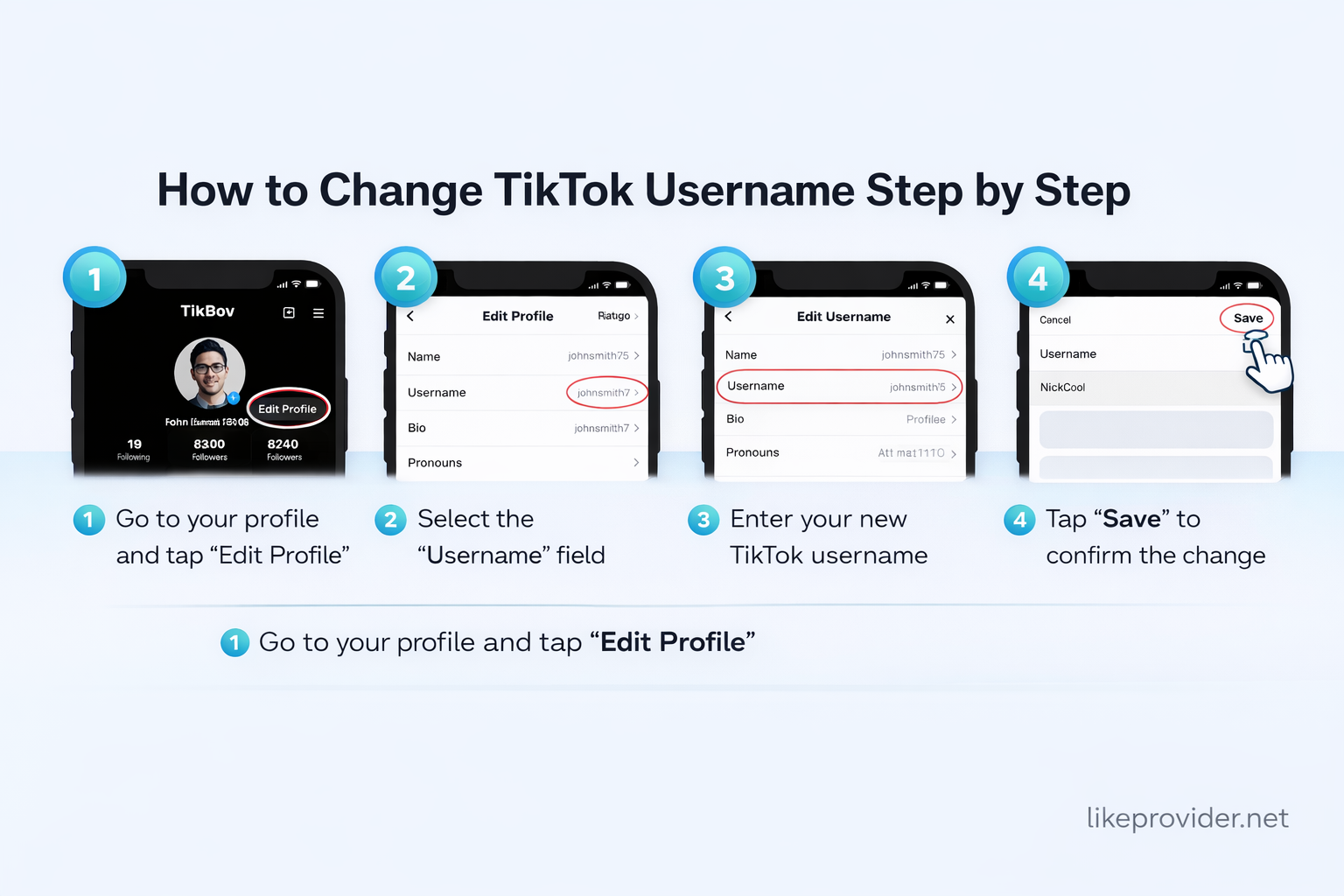
Quick Answer: To change your TikTok username, open your profile, tap Edit Profile, enter a new username, and save. TikTok allows username changes once every 30 days.
Things to Know Before Changing Your TikTok Username
Before updating your username, it’s important to understand how this change affects your profile links and online visibility. While learning how to change TikTok username, remember that your profile URL will change, meaning old links shared on websites or social platforms may stop working. Updating these links in advance helps prevent confusion and traffic loss.
Choosing a username carefully is essential, as you will not be able to change it again for 30 days. This makes planning ahead a smart move, especially for creators and brands.
Understanding TikTok Username Rules and Limits
TikTok has clear rules when it comes to usernames. They must be between 2 and 24 characters and can include letters, numbers, underscores, and periods. Special characters and symbols are not allowed. If you’re learning how to change tiktok username, keep in mind that TikTok only allows one change every 30 days.
Usernames that involve impersonation, misleading terms, or offensive language are restricted. These policies help maintain trust and authenticity across the platform.
How to Change TikTok Username Step by Step
If you’re wondering how to change tiktok username step by step, the process is straightforward. Open the TikTok app, go to your profile, and tap the Edit Profile button. From there, select the username field and enter your new handle. This is exactly how to change tiktok username in settings, and the same steps apply on both Android and iOS devices.
After saving, TikTok may take a short time to update your username across search results and profile links, but your content and followers remain unchanged.
How Changing Your TikTok Username Affects Search Visibility
Changing your username does not reset your account authority or remove your content, but it can temporarily affect how users find you in TikTok search. When understanding how to change tiktok username, it helps to know that TikTok needs time to reindex your new handle.
Using your new username consistently in your bio and captions can help speed up recognition and visibility within the platform.
Difference Between TikTok Username and Display Name
Many users confuse TikTok usernames with display names. Your username is unique and appears in your profile URL, while your display name can be changed at any time and does not need to be unique. Understanding this difference is essential when learning how to change TikTok username, as each serves a different role in how people find and recognize your profile.
Will Changing Your TikTok Username Affect Followers?
A common concern is whether changing a username causes follower loss. The answer is no. When you change your username, your followers, likes, videos, and engagement remain exactly the same. Knowing how to change tiktok username properly ensures a smooth transition without disrupting your audience.
However, it’s recommended to inform followers so they can easily recognize your updated profile.
To strengthen interaction on your updated profile, tools like free TikTok comments can encourage authentic engagement and make your content look more active to new visitors.
Why TikTok Limits Username Changes
TikTok restricts username changes to once every 30 days to prevent spam, impersonation, and abuse. If you’re exploring how to change tiktok username step by step, this limitation encourages thoughtful decisions and helps maintain platform integrity.
Tips for Choosing a Strong and Memorable Username
A strong username should be easy to read, easy to remember, and closely related to your content or brand. Avoid unnecessary numbers or complex symbols, as they can make your profile harder to search. If you’re unsure how to change tiktok username effectively, testing variations before committing can help you choose confidently.
Common Problems When Changing a TikTok Username
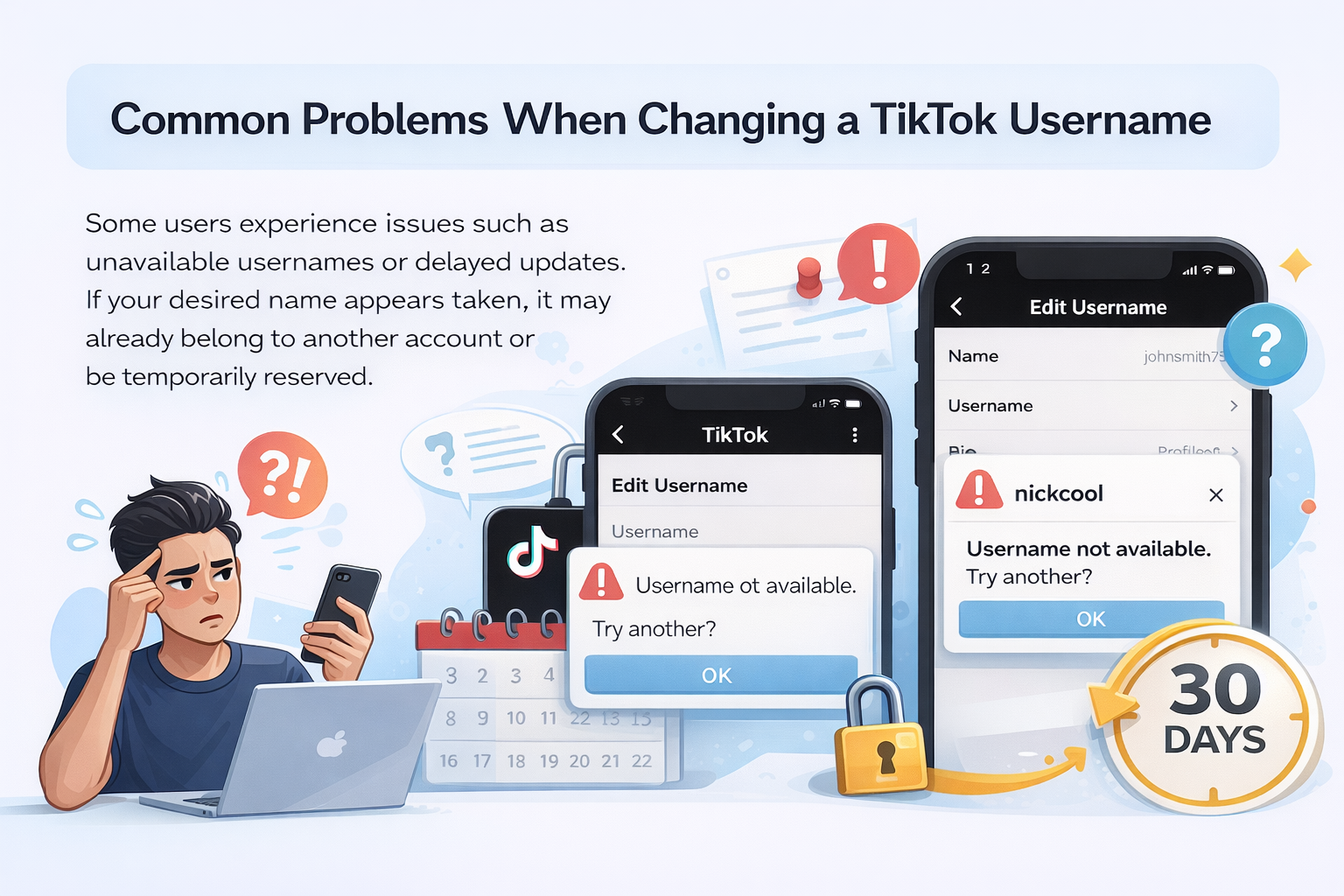
Some users experience issues such as unavailable usernames or delayed updates. If your desired name appears taken, it may already belong to another account or be temporarily reserved. Logging out and back in can sometimes refresh the system.
If you’ve changed your username recently, TikTok will block further changes until the 30-day waiting period ends.
What to Do After Changing Your TikTok Username
After updating your username, notify your followers, update external links, and monitor search results to ensure everything reflects your new identity. Understanding how to change TikTok username is only part of the process; consistency across platforms protects your visibility and engagement.
If you want to improve visibility after updating your username, using services like free TikTok likes can help new and existing content gain faster engagement.
Frequently Asked Questions
Can I change my TikTok username more than once?
Yes, you can change your TikTok username multiple times, but only once every 30 days.
Is there a character limit for TikTok usernames?
Yes, TikTok usernames must be between 2 and 24 characters and can include letters, numbers, underscores, and periods.
Will my followers be affected if I change my username?
No, changing your username does not remove followers or affect existing engagement.
What if my desired username is already taken?
If a username is already taken, TikTok will not allow you to use it. You must choose a unique alternative.
Can I switch back to my old username?
No, once you change your username, you must wait 30 days before changing it again, even if you want to revert.
TikTok’s official username change guide explains the current rules, limits, and requirements directly from the platform.